- All
- Product Name
- Product Keyword
- Product Model
- Product Summary
- Product Description
- Multi Field Search


Views: 162 Author: Site Editor Publish Time: 2026-03-07 Origin: Site


Fiber laser marking machines have revolutionized the way industries handle marking, engraving, and etching applications. Whether it’s for product identification, creating barcodes, logos, or intricate designs, these machines offer high precision, speed, and durability. If you're new to fiber laser marking machines, it’s essential to understand how to operate them effectively to ensure optimal results and avoid errors.
In this article, we will walk you through the process of operating a fiber laser marking machine, including the key components, how to set up the machine, tips for operation, common issues you may encounter, and best practices to maximize efficiency and quality.
Before diving into the operation of a fiber laser marking machine, it’s important to understand what it is and how it works. A fiber laser marking machine uses a solid-state laser technology that employs fiber optics to deliver a high-powered laser beam to the material's surface. This laser beam alters the material’s surface at a microscopic level, causing it to vaporize or etch, leaving a permanent mark.
Fiber lasers are different from CO2 lasers because they use a fiber optic cable to transmit light rather than mirrors and gases. This makes fiber lasers more efficient, smaller, and cost-effective while maintaining a high-quality output.
These machines are widely used in industries like automotive, electronics, aerospace, jewelry, and medical devices for engraving text, serial numbers, logos, and other detailed designs on materials like metals, plastics, and ceramics.
Understanding the key components of a fiber laser marking machine will help you operate it more efficiently. These machines typically consist of the following parts:
Fiber Laser Source: The core component that generates the laser light.
Beam Delivery System: Fiber optic cables deliver the laser beam from the laser source to the marking head.
Focusing Optics: These focus the laser beam into a small spot on the material, controlling the marking size and resolution.
Marking Head: This part of the machine directs the laser beam onto the material and moves across it, marking the design.
Control System: The control system is the brain of the machine, responsible for receiving instructions, controlling the motion of the laser head, and adjusting parameters such as speed, power, and focus.
Cooling System: Fiber laser marking machines often come with a cooling system to ensure that the machine does not overheat during operation.
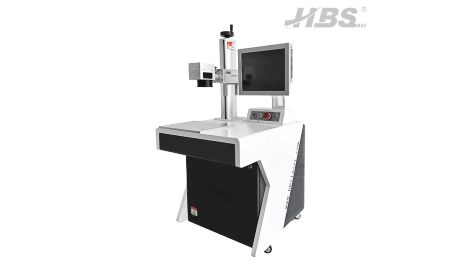
Operating a fiber laser marking machine requires careful attention to setup and configuration. Below is a step-by-step guide on how to operate the machine properly.
Before starting any operation, ensure that the machine is set up correctly and that all safety protocols are in place.
Location: Set up the fiber laser marking machine in a clean, dry, and well-ventilated area. It should be free of dust, chemicals, or any potential hazards that could interfere with the machine's operation.
Safety Gear: Always wear proper safety equipment, such as safety goggles that are specifically designed for laser operation. These will protect your eyes from harmful laser radiation.
Power Supply: Ensure that the machine is connected to a stable power supply with the appropriate voltage. Check the manufacturer's manual for the specific power requirements of your machine.
Laser Enclosure: If your machine has a laser enclosure, make sure it is properly closed during operation to prevent exposure to laser radiation.
Once the machine is set up and safety checks are completed, move on to configuring the control system.
Software Installation: Most fiber laser marking machines come with specialized software that allows you to create and control the designs you want to mark. Install and open the software provided by the machine manufacturer.
Design Input: You can either create designs directly in the software or import files such as vector graphics (DXF, AI, or SVG). Ensure that your design is the correct size for the material you're marking and adjust it as needed within the software.
Adjust Marking Parameters: Adjust the parameters like laser power, marking speed, frequency, and focus. These settings will vary depending on the material and the type of marking you want to achieve (engraving, etching, or coloring). For example, metals typically require higher power than plastics.
Material Type: Ensure that the machine is configured to mark the material you're using. This will help you fine-tune the settings for optimal results.
After configuring the settings, it's time to load the material into the machine.
Positioning the Material: Place the material on the marking bed and ensure it is aligned with the laser head. Some fiber laser machines come with a rotary axis for marking cylindrical or curved surfaces, so if you're working with such materials, use that feature.
Securing the Material: Secure the material with clamps or a vacuum system to prevent it from moving during the marking process. Any movement could result in misalignment or distorted marks.
Proper focusing is crucial for achieving high-quality, precise markings.
Focus Adjustment: Adjust the focus of the laser to ensure the beam is concentrated on the surface of the material. The focus will determine the sharpness and clarity of your markings.
Focus Tool: Most fiber laser marking machines include a focus tool that helps ensure the beam is properly focused on the material.
Once everything is in place, you can begin the marking process.
Test Run: Before marking the final design, it's a good idea to run a test on a small, scrap piece of the same material. This ensures that the settings are correct and the design looks as expected.
Start the Machine: Once satisfied with the settings and test run, press start on the software or the control panel to begin the marking process. The laser will start engraving the design onto the material.
While the machine is running, monitor the process to ensure everything is working smoothly.
Watch for Errors: Pay attention to any issues like misalignment, power fluctuations, or software errors. If something goes wrong, stop the machine immediately and troubleshoot the issue.
Adjust Settings if Necessary: If the marking isn't as sharp as you'd like, you may need to adjust the focus or laser power and run the process again.
Once the marking process is complete, remove the material from the machine.
Inspection: Inspect the marking to ensure that it meets your standards. If necessary, clean the material to remove any debris or dust left behind by the laser.
Shutdown: Power off the machine and perform any necessary cleaning and maintenance as outlined in the user manual.
While fiber laser marking machines are reliable and efficient, some issues may arise during operation. Here are a few common problems and how to fix them:
Uneven Marking: This can be caused by incorrect focus or unstable power settings. Recheck the focus and adjust the laser power to ensure consistent results.
Software Crashes: Ensure that your computer meets the software requirements, and consider reinstalling the software or updating it to the latest version.
Overheating: If the machine overheats, ensure that the cooling system is working properly and that the machine is in a well-ventilated area.
Operating a fiber laser marking machine requires attention to detail, the right settings, and proper maintenance. By following the steps outlined in this guide, you can achieve high-quality, durable markings on a variety of materials. Fiber lasers are ideal for precise, high-speed marking, and once you understand how to operate them effectively, you can significantly improve your production process.
For more information on fiber laser marking machines and to explore high-quality solutions for your business, HBS Tech Co., Ltd. offers reliable products and expert assistance to help you with your marking needs.
Q: What materials can be marked with a fiber laser machine?
A: Fiber laser machines can mark a wide variety of materials, including metals, plastics, ceramics, glass, and some organic materials like wood and leather.
Q: How precise is a fiber laser marking machine?
A: Fiber lasers offer micron-level precision, allowing for detailed and intricate designs such as logos, barcodes, and serial numbers.
Q: How do I choose the right fiber laser marking machine for my needs?
A: Consider factors such as material compatibility, marking area size, laser power, and the type of designs you need to produce. You can consult with experts for guidance.
Q: What are the benefits of using fiber lasers over other laser types?
A: Fiber lasers are more efficient, compact, and cost-effective than CO2 lasers, offering better precision, faster marking speeds, and lower maintenance requirements.


